
AI outbound sales works when it augments reps rather than replaces them: automating research, personalization, and follow-ups while a human handles judgment calls and closing. Done with real inbox sending, tight signal targeting, and review controls, teams typically see more meetings booked with less manual grind. Done sloppily, with shared sending infrastructure and scraped lists, it burns domain reputation fast. The rest of this piece covers how to evaluate it, pilot it, and avoid the mistakes that sink most first attempts.
TL;DR:
- Using real inbox sending with trusted domain authentication and strict deliverability monitoring prevents reputation damage and ensures higher response rates.
- Focus on signal-driven prospecting and personalized messaging for high-value accounts, rather than volume-based approaches that target broad lists.
- Evaluate outbound AI tools based on data freshness, signal monitoring transparency, inbox setup, integration with CRM, and outcome-based pricing models.
- Pilot AI outbound workflows like intent-based targeting, CRM reactivation, multichannel outreach, or autonomous booking within a small, measureable timeframe.
- A pay-per-result model, like Leadsnow’s, aligns incentives to actual booked meetings rather than activity volume, reducing risk and increasing ROI.
Table of Contents
- What Is AI Outbound Sales and What Can It Actually Do?
- How Do These Capabilities Show Up in Day-to-Day Selling?
- How Should You Evaluate and Choose an Outbound AI Approach?
- Five Outbound AI Workflows Worth Piloting
- Implementation Best Practices That Protect Your Sending Reputation
- What Real Results Look Like: The Pay-Per-Result Model
- A Practical Pilot Recipe Worth Stealing
- How Leadsnow Makes AI Outbound Low-Risk to Try
- Where to Read More on AI Outbound Sales
- Sources
How it works
How an AI sales agent books your appointments
Your list or CRM
We start from data you already own — past enquiries, dormant customers, or a targeted prospect list.
The agent makes contact
Email, SMS and voice, with follow-up that persists for weeks instead of stopping after two attempts.
Qualified against your rules
Budget, timing and fit are checked before anything reaches your team, using criteria you set.
Booked into your calendar
Only qualified prospects reach the booking step, so your closers spend their time selling.
MAKE MORE SALES.
Pay-Per-Result pricing — We scale sales HARD aligned to your interests, better than anyone else.
What Is AI Outbound Sales and What Can It Actually Do?
AI outbound sales refers to software or managed services that use machine learning and large language models to handle the repetitive mechanics of prospecting: finding the right accounts, writing personalized messages, sequencing follow-ups, and sorting replies. It automates the busywork. It does not automate trust, and it should not automate every decision.
Reps and managers still need to set strategy, approve messaging tone, handle objections on calls, and close. What changes is how much of the pipeline gets built before a human ever touches it. Outbound AI tools now handle prospecting, lead research, drafting, and follow-up sequencing well enough that reps spend more of their day on conversations instead of data entry, according to AiSDR’s rundown of outbound AI tools.
The capability set has settled into a fairly consistent stack across vendors and in-house builds:
- Signal detection and list building: monitoring funding rounds, hiring surges, tech stack changes, or website visits to flag accounts worth prioritizing.
- Enrichment: pulling contact-level and company-level data to fill in job titles, firmographics, and recent news.
- AI-drafted personalization: generating first-draft emails or LinkedIn messages that reference the specific signal or account context, not generic templates.
- Sequencing and automated follow-ups: scheduling multi-touch cadences across email and social without a rep manually queuing each step.
- Reply classification: sorting responses into “interested,” “not now,” “wrong contact,” or “unsubscribe” so reps only see what matters.
- Calendar booking: letting qualified replies self-schedule a meeting without a back-and-forth email chain.
- CRM sync and reporting: logging activity and outcomes automatically so pipeline data stays current without manual updates.
Here’s the reality check: not every capability solves the same problem. Signal detection and enrichment fix a targeting problem (who to contact). Drafting and sequencing fix a throughput problem (how many people you can reach). Reply classification and booking fix a conversion problem (turning interest into a calendar slot). If your bottleneck is targeting, buying a tool that only automates volume will make a mediocre list move faster, not perform better.
Want this done for you? We book qualified sales appointments on a Pay-Per-Result basis — you only pay for calls that actually land in your calendar.
How Do These Capabilities Show Up in Day-to-Day Selling?
The theory sounds clean. The daily reality is messier and more interesting, because deliverability and personalization quality determine whether any of it converts.
Picture an SDR team targeting mid-market SaaS companies. Instead of pulling a static list from a database, the system watches for hiring signals in specific roles (a new VP of Sales, say) and surfaces those accounts automatically. That’s signal-driven prospecting, and it consistently outperforms static list-and-blast approaches because the message lands when the account has an actual reason to care, not because a name matched a filter, per Highspot’s analysis of AI-driven outbound strategy.
From there, the AI drafts a first-pass email referencing the trigger event, a rep skims and adjusts tone in under a minute, and the message goes out from that rep’s real inbox rather than a shared sending domain. Replies come back and get classified automatically: a “not interested” gets archived, a “maybe in Q3” gets tagged for a nurture sequence, and a genuine “yes, let’s talk” routes straight to the rep’s calendar link. The rep never manually triaged the batch. They just handled the three replies that mattered.
Pro Tip: Watch what happens to your open and reply rates when you switch from a shared warmup domain to sending through OAuth-connected personal inboxes. Real inbox sending consistently protects deliverability better than pooled infrastructure, because mailbox providers trust established sender history over a domain that just got spun up for outbound.
That distinction between real inbox sending and shared infrastructure is where most vendor pitches quietly diverge, and where it pays to ask hard questions before you sign anything, according to Outmate’s breakdown of autonomous outbound systems. Shared sending pools can work at first, but once one client in the pool gets flagged for spam, everyone sharing that domain reputation feels it.
A few other patterns show up consistently in mature outbound AI setups:
- Reactivation campaigns targeting dormant CRM leads outperform cold lists because the contact already has some familiarity with the brand.
- Multi-touch sequences that blend LinkedIn engagement with email tend to get better response rates than email-only cadences for executive-level targets.
- Reply quality, not raw reply volume, is the metric that predicts booked meetings. A sequence generating fifty polite “no thanks” replies is worse than one generating five genuine “tell me more” replies.
None of this requires exotic tooling. It requires disciplined targeting and a sending setup that protects your reputation, which is the part most teams skip when they’re excited about the AI part.
How Should You Evaluate and Choose an Outbound AI Approach?
Start with the job you’re actually trying to do, not the feature list a vendor hands you. Outbound AI tools generally split into three types: assistive agents that help a rep work faster, autonomous digital workers that run sequences with minimal oversight, and platform features bolted onto an existing CRM or sales engagement tool. Choosing by category before comparing features saves you from buying an autonomous system when what you needed was a faster assistant, according to Vector Agents’ comparison of outbound AI agents.
Ask yourself which of these three describes your actual need:
- Augment existing SDRs so they write and send faster without losing their voice.
- Extend coverage into segments or hours your current team can’t reach.
- Run autonomous booking for a simple, well-defined offer where a human touch adds little before the first call.
Once you know the job, run every vendor or internal build through the same checklist:
- How fresh is the underlying data, and how often does it refresh?
- What signals does it actually monitor, and can you see the raw signal, not just a score?
- Does it send from real, OAuth-connected inboxes or shared/warmup domains?
- How does it integrate with your CRM and calendar, and is that sync two-way?
- Can you set manual approval on drafts before anything sends?
- What does reporting show beyond “emails sent,” specifically reply quality and meetings booked?
- What’s the pricing model, and is any part of it tied to actual outcomes?
- What’s the data privacy and compliance posture, including where contact data is stored?
- Is there an audit log showing what the AI sent and when?
- What happens to your list and sending reputation if you cancel?
Watch for a few red flags during any demo. Vendors that dodge questions about their sending infrastructure, that can’t show you where enrichment data actually comes from, or that lack any audit trail of AI-generated sends are telling you something. Fragmented data with no clear source, and heavy reliance on purchased or scraped contact lists, tends to correlate with poor deliverability down the line, echoing feedback patterns seen in G2’s review data on outbound platforms and Capterra’s product listings, where deliverability and integration depth are the recurring differentiators between vendors.
On cost, resist evaluating tools purely by seat price. The number that matters is cost per booked, qualified meeting, factored against ramp time (how long before the system produces its first meeting) and the quality of those meetings once they hit a rep’s calendar. A cheap tool that takes eight weeks to configure and produces low-intent bookings costs more than an expensive one that starts converting in week two.
Pro Tip: Before you sign anything, ask the vendor to show you three real reply threads from an existing customer, not screenshots of a dashboard. If they can’t produce actual reply text, they’re selling you a promise, not a working system.
If we can’t make you money, we don’t deserve yours.
Pay-Per-Result pricing — performance-based alignment.
Five Outbound AI Workflows Worth Piloting
You don’t need to rebuild your entire outbound motion to test whether AI helps. These five workflows are narrow enough to pilot in a month and clear enough to measure honestly.
-
Intent-driven account plays. Trigger: a target account raises funding, posts a relevant job listing, or adopts a competing tool. Data source: signal monitoring plus firmographic enrichment. Messaging: highly specific, referencing the trigger directly. Qualification: manual review before send, since these are high-value accounts. Success metric: meetings booked per 100 triggered accounts.
-
Volume one-to-one sends. Trigger: a defined ICP list segment with no immediate signal. Data source: enrichment for role and company context. Messaging: AI-drafted but personalized per contact, sent from real reps’ inboxes. Qualification: reply classification routes interested leads to reps automatically. Success metric: reply rate and percentage of replies marked qualified.
-
CRM reactivation. Trigger: leads sitting dormant for 90-plus days with no rep activity. Data source: existing CRM history plus any new firmographic changes. Messaging: acknowledges the prior relationship rather than pretending it’s a cold intro. Qualification: any positive reply routes to the original owning rep if still active. Success metric: percentage of dormant leads converted to a booked call. One documented reactivation program hit a 4.4% average conversion rate on dormant CRM leads, with peak performance reaching 8.9%.
-
Multi-touch executive outreach. Trigger: named accounts with a specific decision-maker target. Data source: LinkedIn activity plus email enrichment. Messaging: coordinated sequence alternating LinkedIn engagement and email, spaced to avoid feeling automated. Qualification: manual rep review at every touch given the account value. Success metric: meetings booked with the named decision-maker specifically, not a delegate.
-
Low-touch autonomous booking. Trigger: inbound interest or a simple, well-understood offer with low price complexity. Data source: minimal enrichment needed since the offer is straightforward. Messaging: templated but AI-personalized on name and basic context, sent and sequenced with no manual review step. Qualification: booking link embedded directly in the first qualified reply. Success metric: time from first contact to booked call.
Run one or two of these, not all five at once. A pilot spread across five workflows produces five sets of noisy, inconclusive data instead of one clear signal.
Implementation Best Practices That Protect Your Sending Reputation
Most AI outbound failures aren’t AI failures. They’re deliverability and governance failures that happen to involve AI.
Stage your rollout in three phases instead of flipping a switch to full automation. Start in review mode, where every AI-drafted message needs a human click before it sends. Move to partial autonomy once you trust the drafting quality, where low-stakes segments send automatically but high-value accounts still get reviewed. Only move to full autonomy for the narrowest, best-understood use case, and even then keep an approval toggle you can flip back on instantly if something looks off.
Deliverability deserves its own checklist, because this is where reputations get burned in ways that take months to repair:
- Connect sending through OAuth into real Gmail or Outlook accounts rather than shared sending pools, which preserves individual sender reputation, as noted in Outmate’s implementation guidance.
- Authenticate your sending domains with SPF, DKIM, and DMARC before scaling volume.
- Throttle send volume per inbox, especially in the first few weeks of a new sequence.
- Handle unsubscribes and suppression lists automatically and immediately, not on a weekly batch job.
- Monitor inbox placement regularly, not just open rates, since a message landing in spam still counts as “sent” in most dashboards.
Ownership matters more than most teams admit upfront. Someone needs to own the signal sources and keep them tuned, someone needs to own sequence copy and tone, and someone needs to own the reporting that actually gets reviewed weekly. When ownership is diffuse, sequences go stale and nobody notices until reply rates quietly drop.
Pro Tip: Track “reply quality,” not just reply rate, from week one. A sequence that gets ignored is a minor problem. A sequence that gets marked as spam by real prospects is a reputation problem that outlives the campaign.
The most common pitfall is tool fragmentation: a signal tool that doesn’t talk to the sequencing tool, which doesn’t talk to the CRM, which means someone spends hours a week reconciling data by hand. Favoring an integrated workflow, intent detection flowing into drafting, into sequencing, into CRM sync, without manual handoffs between each step, avoids most of the operational drag teams report once they scale past a small pilot.
What Real Results Look Like: The Pay-Per-Result Model
Some agencies run outbound as a pay-per-result service: AI agents handle prospecting, outreach, and qualification, and clients pay when a qualified appointment actually lands on the calendar, not for activity or seat licenses. That structure exists because Leadsnow’s model ties its own success directly to whether the pipeline it builds actually converts into meetings. LeadsNow’s version is described on its outbound appointment setting service page.
The headline numbers Leadsnow points to include a documented 7× sales lift for clients and more than 50,769 AI-booked appointments delivered across client accounts. Those figures come from combining AI-driven outbound with continuous data analytics, adjusting targeting and messaging based on what’s actually converting rather than running a static campaign for months.
The clients who see the fastest return tend to share a few traits:
- Fitness businesses and gym operators, where a steady flow of qualified trial or consultation bookings directly drives revenue, benefit from playbooks like the ones detailed in Leadsnow’s fitness lead generation guidance.
- High-ticket coaches and consultants, who need a small number of highly qualified conversations rather than a large volume of low-intent leads.
- B2B startups and SaaS teams, where a compliance-aware script and tight qualification rules matter as much as volume, particularly when selling into regulated buyers.
Pilots typically start narrow: one offer, one or two target segments, compliance-specific scripting reviewed upfront, and a short measurement window before scaling spend. That structure mirrors the pilot discipline covered earlier: prove it small, then expand.
A Practical Pilot Recipe Worth Stealing
If you’re testing AI outbound for the first time, keep the pilot small enough to actually learn something. Thirty to sixty days, one connected inbox, one or two signals you actually trust, and review mode switched on for every send. That’s it.
Your checklist: connect the inbox through OAuth rather than a shared sending pool, build a suppression list before you send anything, turn on reply routing so qualified replies land directly on a calendar, and track exactly two numbers weekly: meetings booked and qualified lead rate.
Here’s the candid part most vendors won’t tell you. If thirty days in you’re not seeing reply quality improve or meetings trending up, don’t keep tweaking subject lines. Change the signal you’re targeting or the offer itself. The tool rarely is the problem. The targeting almost always is.
— Riley
How Leadsnow Makes AI Outbound Low-Risk to Try
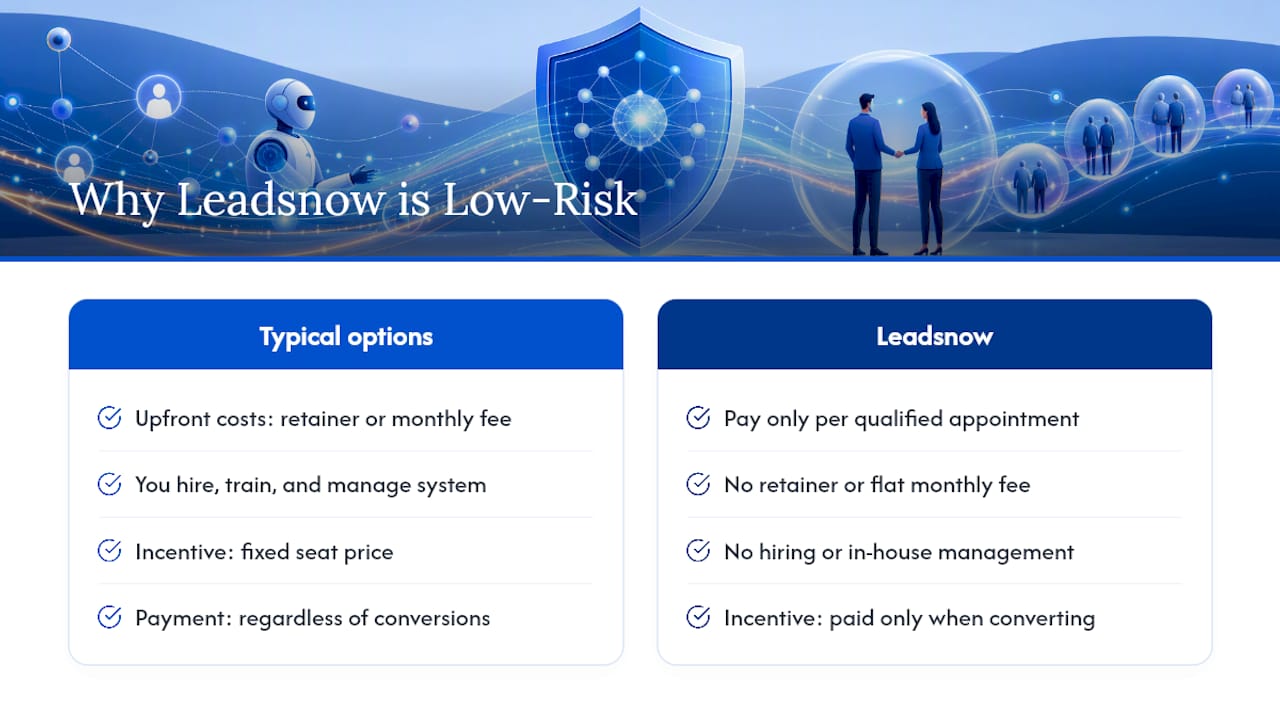
Every option in this playbook, whether a full software platform or an in-house build, still requires you to hire, train, and manage the system yourself. Leadsnow takes a different route: you pay only when a qualified appointment actually lands on your calendar, with no retainer and no flat monthly fee sitting between you and results.
That pay-per-result structure means Leadsnow’s AI-driven outbound system has to keep converting to keep getting paid, which is a different incentive than a tool vendor charging you the same seat price whether your reply rate is 2% or 20%. Fitness businesses, high-ticket coaches, consultants, and startups tend to see the fastest results because their offers are specific enough for AI qualification rules to work cleanly from day one.
Onboarding starts with a short setup: defining your ideal customer, connecting your calendar, and reviewing compliance-aware scripts before anything sends. If you run a gym or fitness business specifically, Leadsnow’s lead generation planning guide walks through what a first pilot typically measures. From there, the next step is simple: book a call with Leadsnow to scope a pilot around your actual offer and see what a pay-per-result appointment pipeline looks like for your business.
Where to Read More on AI Outbound Sales
A few sources worth bookmarking if you want to go deeper on any piece of this playbook:
- AiSDR’s outbound AI tool roundup covers a wide range of current tools and how each automates prospecting and drafting.
- Vector Agents’ agent comparison breaks down the three main product categories so you can match tool type to your actual need.
- Highspot’s outbound strategy guide explains why signal-driven targeting consistently beats batch outreach.
- Leadsnow’s coach vs. SDR cost breakdown is useful if you’re budgeting a pilot against hiring an in-house rep.
Sources
- 16 Best AI Outbound Sales Tools and Recipes in 2025 (AiSDR)
- Best outbound AI sales agents in 2026 (ranked + compared) — Vector Agents
- How to Improve Your Outbound Sales Strategy with AI — Highspot
- AI-Powered Outbound with Autonomous Revenue Agents | Outmate
Recommended
- AI Appointment Setter vs Human SDR for Coaches: 2026 Cost & Performance Breakdown
- AEO for Mortgage Brokers and Financial Planners: 2026 Playbook
- Cost Per Booked Discovery Meeting for B2B Consultants: 2026 Australian Benchmarks
Created with BabyLoveGrowth’s AI writer
Pay-Per-Result appointments
See if we’re a fit
We book qualified sales appointments for you and you pay on results, not retainers. Our booking page asks a few quick questions so you find out in two minutes whether that model suits your business.
- 50,769+ appointments booked without cold calling.
- Pay-Per-Result pricing — you pay for booked, qualified calls.
- Pick your own time on our live calendar, no phone tag.