
Start with a 10-touch, 21-day multi-channel outbound cadence and run a 30-day test against a single ICP segment before you scale it. Most high-performing outbound cadences run 8 to 12 touches over roughly 17 to 21 days, mixing email, phone, and LinkedIn to capture replies while they’re still likely, according to Fundraise Insider. That structure gives you a fast, measurable baseline before you branch into inbound, signal-triggered, or tiered variants.
TL;DR:
- A 10-touch, 21-day outbound cadence is recommended for most B2B teams, with an initial test period of 30 days against a single target segment.
- Cadences should be structured with front-loaded touches using a 3-7-7 pattern, emphasizing early messaging to capture responses before prospects lose interest.
- Clear ownership, exit rules, and consistent tracking are essential for effective cadence management and continuous improvement.
- Signal-triggered cadences improve response rates by triggering outreach based on specific events, often requiring fewer touches over 10 to 12 days.
- Avoid common pitfalls like under-segmentation, skipping exit rules, and over-automation to maintain the effectiveness and human touch in outreach.
Table of Contents
- What a sales cadence is and how it differs from a sequence
- Why cadences matter: benefits and realistic performance expectations
- Six-step framework to design and document a deployable cadence
- Copyable cadence templates: cold outbound, inbound, and tiered variants
- Timing and channel mix best practices
- Signal-triggered cadences: triggers, benefits, and a compact template
- Measure, optimize, and run safe automation: KPIs and exit rules
- How pay-per-result appointment setting changes cadence choices
- Three mistakes that quietly wreck a good cadence
- If you prefer an outsourced, pay-per-result alternative
- Sources
- FAQ
How it works
How an AI sales agent books your appointments
Your list or CRM
We start from data you already own — past enquiries, dormant customers, or a targeted prospect list.
The agent makes contact
Email, SMS and voice, with follow-up that persists for weeks instead of stopping after two attempts.
Qualified against your rules
Budget, timing and fit are checked before anything reaches your team, using criteria you set.
Booked into your calendar
Only qualified prospects reach the booking step, so your closers spend their time selling.
MAKE MORE SALES.
Pay-Per-Result pricing — We scale sales HARD aligned to your interests, better than anyone else.
What a sales cadence is and how it differs from a sequence
A sales cadence is the overall rhythm and strategy behind your outreach: how many touches, which channels, and how they’re spaced across days or weeks. A sequence is the specific set of steps and messages that execute that rhythm inside your sales engagement tool. HubSpot defines a cadence as a planned rhythm of outreach and treats the sequence as the operational layer that carries it out, with touchpoints commonly spaced every two to three days for about two weeks in many sequences.
The distinction matters for managers because it separates strategy from execution. You set the cadence (the plan: 10 touches, three channels, 21 days), and reps or automation run the sequence (the actual emails, calls, and LinkedIn messages on the calendar). Treating cadence as strategy also means your team can update targeting or timing without rebuilding every template from scratch.
A few quick contrasts show the difference in practice:
- An outbound cadence for cold prospects might call for slow, educational spacing across three weeks, while its sequence contains the specific email copy and call scripts for each day.
- An inbound cadence for a demo request calls for near-immediate response, and Salesforce’s own inbound example recommends a call within five minutes of form submission and delivery of the requested asset on Day 1, according to Salesforce.
- A signal-triggered cadence (say, a prospect just changed jobs) reuses your existing sequence steps but compresses the timeline because intent is already high.
Want this done for you? We book qualified sales appointments on a Pay-Per-Result basis — you only pay for calls that actually land in your calendar.
Why cadences matter: benefits and realistic performance expectations
A documented cadence turns scattered follow-up into something coachable. New reps can see exactly what touch comes next, managers can diagnose where deals stall, and forecasting improves because outreach stops depending on any one person’s memory. The benefit compounds across a team: consistent cadences mean every lead gets the same baseline coverage, regardless of who owns the account.
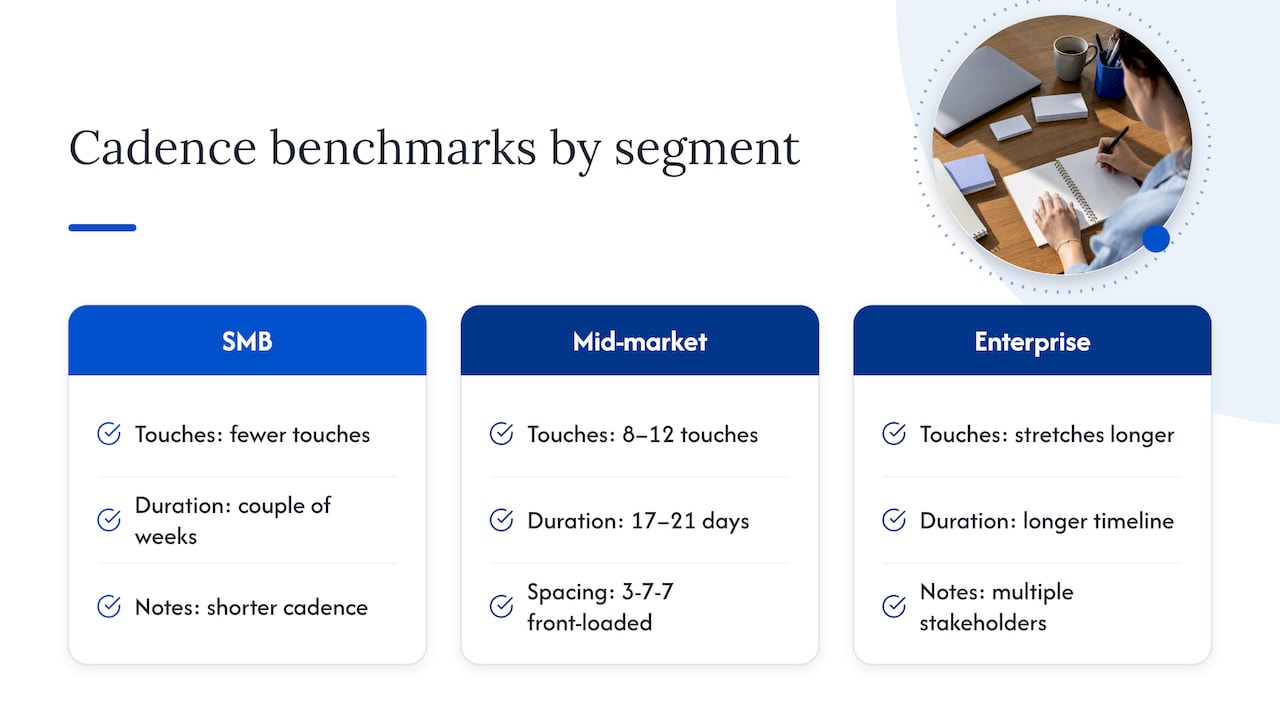
Realistic benchmarks help set expectations before you launch. Practitioner data points to 8 to 12 touches over 17 to 21 days for mid-market outbound cadences, with SMB cadences running shorter (fewer touches over a couple of weeks) and enterprise cadences stretching longer to accommodate multiple stakeholders, according to Fundraise Insider.
Front-loading touches captures most replies early. Aggregated practitioner research points to a “3-7-7” spacing pattern, with several touches early on and then wider gaps, as a structure that captures the bulk of replies before prospects go cold, according to Fundraise Insider. That front-loaded rhythm is why the first week of any cadence deserves your sharpest messaging, not your weakest.
Six-step framework to design and document a deployable cadence
Templates only work when they’re built on a clear process. This six-step framework turns a generic 10-touch idea into something your team can actually run, measure, and improve.
- Define your ICP and the trigger. Decide which segment you’re targeting (title, company size, industry) and what event justifies outreach right now, whether that’s a form fill, a signal, or a cold list pull.
- Set one conversion goal per cadence. Pick a single outcome, a booked meeting, a reply, a demo request, so every touch can be judged against it instead of vague “engagement.”
- Map timing and channels. Decide how many days the cadence runs and which channels appear on which day; front-load the first week per the 3-7-7 pattern, then widen spacing.
- Write a message angle for each touch. Every touch needs a distinct angle (value point, proof point, question, or nudge) rather than a repeated pitch, per Sendspark’s guidance to add new value at each step.
- Build automation and exit rules before launch. Decide exactly when automation stops, on reply, on meeting booked, or on a negative signal, and document the handoff to a human rep.
- Set KPIs and a reporting cadence. Track replies, positive conversations, meetings held, and opt-outs weekly, and review the data at 30 days before deciding to scale or retire the cadence.
Ownership matters as much as the steps themselves. One person, usually a sales manager or RevOps lead, should own the cadence template and its exit rules, while reps own judgment calls inside individual conversations. Documenting who updates the template, and how often, prevents five reps from quietly running five different versions of the same “official” cadence. HubSpot recommends defining exit rules and human handoff points before automating a sequence, precisely because automation without a clear stop condition tends to create ill-timed or duplicate follow-ups.
Documentation itself doesn’t need to be complicated. A simple table listing day, channel, purpose, message angle, owner, and exit condition for each touch gives reps and managers a shared reference and makes it easy to spot a broken step.
Pro Tip: Set automation to stop on reply or stop on booking from day one, then run the finished cadence for a full 30 days before you decide whether to expand it to a second segment.
If we can’t make you money, we don’t deserve yours.
Pay-Per-Result pricing — performance-based alignment.
Copyable cadence templates: cold outbound, inbound, and tiered variants
Below are templates you can drop directly into a sequence tool. Each follows the ICP, trigger, and exit-rule logic from the framework above; adjust the channel mix to what’s actually available to your team (some reps won’t have a dialer or video tool, and that’s fine).
10-touch cold outbound (21 days). This is the default starting cadence for most B2B teams working a cold list:
- Day 1: Email, an opening value point tied to a specific pain the ICP segment faces.
- Day 3: Call, a brief voicemail if no answer, referencing the Day 1 email.
- Day 5: LinkedIn connection request with a short personalized note.
- Day 7: Email, a proof point or short case reference.
- Day 9: Call attempt, no voicemail.
- Day 12: Personalized video (60 seconds or less, one clear call to action), a strong pattern interrupt around this point in the cadence, per Sendspark.
- Day 15: Email, addressing a likely objection.
- Day 17: LinkedIn message following up on the connection.
- Day 19: Call attempt.
- Day 21: Breakup email, a short note that closes the loop and often drives a reply by offering an easy opt-out, a pattern Salesforce highlights in its own templates.
7-touch inbound and event follow-up (10 days). Built for speed, since inbound leads convert best when contacted fast:
- Day 1 (within minutes): Call attempt plus immediate email delivering the requested asset, matching Salesforce’s inbound guidance to respond within five minutes of a form fill.
- Day 1 (later): Follow-up email if no answer on the call.
- Day 2: LinkedIn connection with reference to the specific form or event.
- Day 4: Short personalized video (touch 2-3 for inbound cadences works well here, per Sendspark).
- Day 6: Call attempt.
- Day 8: Email with a proof point or relevant resource.
- Day 10: Breakup email closing the loop.
Tiered variants adjust length and channel mix by account size:
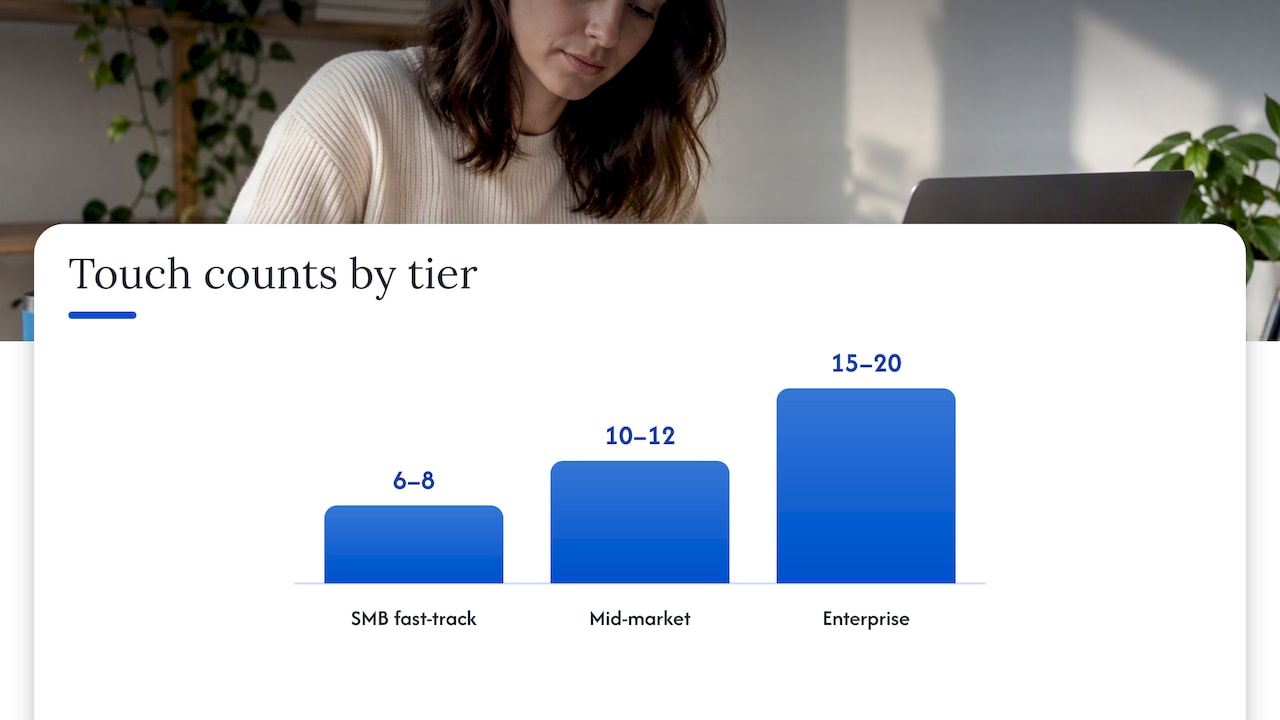
| Tier | Touch count | Duration | Channel emphasis |
|---|---|---|---|
| SMB fast-track | 6 to 8 touches | 10 to 14 days | Email and phone, minimal video |
| Mid-market default | 10 to 12 touches | 17 to 21 days | Email, phone, LinkedIn, one video |
| Enterprise multi-threaded | 15 to 20 touches | 4 to 6 weeks | Email, phone, LinkedIn, video, multiple stakeholders |
These tier definitions come from segment-specific practitioner guidance tying cadence length and channel mix to deal size and decision complexity, according to Fundraise Insider. Enterprise cadences also need multi-threading (reaching more than one stakeholder), something Salesforce’s own enterprise example builds in across its Day 1 to Day 21 template, per Salesforce.
For message angles, three touches carry the most weight: the opener (a specific pain point, not a generic pitch), the video touch (a face and a single ask, nothing else), and the breakup (a genuine close, not a guilt trip). Teams building fitness or SMB-style inbound sequences can find adaptable short-form examples in email playbooks for gyms and event follow-up hacks.
Timing and channel mix best practices
Channel choice isn’t arbitrary. Email carries the bulk of your touches because it’s low-cost and easy to personalize at scale, phone calls create the highest-intent conversations when they connect, LinkedIn builds familiarity for prospects who ignore email, and video breaks the pattern of a purely text-based sequence. A combined approach, rather than relying on email alone, tends to perform better because it reaches prospects across the channels they actually check, a point echoed in guidance on mixing phone, email, and professional-social outreach.
Spacing should front-load the first week and widen afterward. The 3-7-7 pattern (heavier early touches, then wider gaps) captures replies while intent is fresh and avoids exhausting a list too quickly, per Fundraise Insider. Video works best placed at touch 3-4 in cold cadences and touch 2-3 in inbound cadences, kept to about 60 seconds with a single call to action, according to Sendspark. Voicemail should be brief and reference the most recent touch rather than repeating the whole pitch; a call with no answer and no voicemail is fine too, since not every attempt needs one.
A few operational rules keep cadences from working against you:
- Skip weekends for B2B email sends and time calls for the target’s business hours, not yours.
- Adjust send windows across time zones rather than blasting one schedule to a global list.
- Space touches wider for enterprise accounts where multiple stakeholders need to be looped in without feeling rushed.
Pro Tip: Watch for prospect fatigue, not just your own team’s activity metrics; a cadence that looks healthy on paper can still exhaust a list if the messaging repeats the same angle twice, an issue covered in more depth in guidance on audience fatigue.
Signal-triggered cadences: triggers, benefits, and a compact template
Calendar-based cadences treat every prospect the same regardless of what’s happening in their world. Signal-triggered cadences instead launch when a specific event suggests a prospect is more likely to respond right now.
- Funding announcements signal new budget and often a mandate to spend it quickly.
- Job changes put a prospect in a new role where they’re actively evaluating tools and vendors.
- Hiring surges in a relevant department suggest growth and new operational needs.
- Technographic changes (a new tool adopted or dropped) can indicate a gap your offer fills.
- Content engagement (downloading a guide or attending a webinar) shows active interest worth acting on fast.
Signal-triggered cadences can significantly outperform calendar-based outreach, often producing far higher reply rates when the timing lines up with the trigger, and they typically need fewer touches because intent is already elevated, according to Gangly. A compact signal-triggered cadence might run six to eight touches over 10 to 12 days: an immediate email referencing the specific trigger, a call within 48 hours, a LinkedIn connection tied to the same event, a short video by touch 4, one more email addressing likely urgency, and a brief breakup message if there’s no response.
Measure, optimize, and run safe automation: KPIs and exit rules
A cadence without measurement is just a habit. Track a short list of KPIs weekly and review them at the 30-day mark before deciding whether to scale, adjust, or retire a template:
- Reply rate, the clearest signal of whether your message angles are landing.
- Positive conversation rate, since not every reply is a good one.
- Meetings held (not just booked), which filters out no-shows and low-intent bookings.
- Opportunities created, tying the cadence directly to pipeline.
- Opt-out rate, an early warning that messaging or frequency is off.
Signal-triggered cadences can reduce required touches by 30 to 50% because prospect intent front-loads the response, according to Gangly. That’s a meaningful efficiency gain worth testing against your calendar-based baseline before committing a full team to one approach.
Prioritize A/B tests on timing (does Day 1 or Day 2 email perform better after a trigger), channel mix (does adding LinkedIn lift replies enough to justify the rep time), and message angle (proof point versus direct question as an opener). On the automation side, build in guardrails from the start: stop-on-reply and stop-on-booking are non-negotiable in any modern sequence tool, and domain reputation safeguards (sending limits, warm-up periods) protect deliverability across the whole team, not just one cadence, per HubSpot’s guidance on defining exit rules before automating.
How pay-per-result appointment setting changes cadence choices
Not every team has the bandwidth to build, test, and maintain cadences across multiple segments at once. That’s where pay-per-result appointment setting becomes a relevant option: instead of a team managing timing, message angles, and exit rules internally, an outside partner runs the cadence and the client pays only when a qualified appointment lands on the calendar.
An AI-based pay-per-result appointment setting model combines AI sales agents with data analytics to run and continuously adjust outreach for clients, rather than charging a flat retainer regardless of results.
AI-driven personalization also changes the frequency trade-off. Where a human rep might struggle to write a distinct message angle for touch 6 of 10 across hundreds of contacts, AI systems can generate that variation at scale, which shifts the practical ceiling on how many touches a cadence can sustain before messaging starts repeating itself.
Three mistakes that quietly wreck a good cadence
Teams often build a cadence, then undermine it in three predictable ways. The first is under-segmentation: one cadence for every prospect, regardless of signal or ICP tier. The fix is tighter segment slices and signal filters, not more touches. The second is skipping exit rules, which leads to awkward post-reply automation; stop-on-reply and stop-on-booking should be non-negotiable. The third is over-automation, where nobody reviews a reply before the next email fires. Keep a human on qualification, always.
— Riley
If you prefer an outsourced, pay-per-result alternative
Building and maintaining cadences in-house makes sense when you have the reps and the time to test message angles properly. It makes less sense when speed-to-calendar matters more than owning every step, or when a flat retainer doesn’t match a team still validating its ICP.
If you’re evaluating a pay-per-result partner, look for a few things: a pricing model tied to actual booked appointments rather than a flat monthly fee, clear reporting on meetings held (not just booked), and a process for qualifying leads before they hit a rep’s calendar. LeadsNow AI runs on exactly that model, charging a per-result fee or revenue share rather than a retainer, so the appointment-setting cost stays tied to outcomes. If a managed, done-for-you option fits better than building every cadence internally, explore LeadsNow AI’s AI appointment setting service to see how it fits your pipeline.
Sources
- Sales sequences: 12 best practices for B2B teams in 2026
- Sales cadence examples and templates
- Best sales cadences: how to build outreach sequences
- Sales cadence best practices and templates
- Prospecting cadence — default and signal-based templates
FAQ
What is a good sales cadence?
A good sales cadence matches touch count and timing to the segment: roughly 8 to 12 touches over 17 to 21 days for mid-market outbound, shorter for SMB, and longer for enterprise, according to Fundraise Insider. It mixes channels, front-loads the first week, and includes clear exit rules so automation stops on reply or booking.
What are the four types of cadences?
Most teams organize cadences into outbound cold, inbound or event follow-up, signal-triggered, and tiered (SMB, mid-market, enterprise) variants. Each type differs mainly in speed and touch count: inbound moves fastest, signal-triggered compresses timing around a specific event, and enterprise stretches longest to accommodate multiple stakeholders.
What are some examples of cadence?
A common cold outbound example runs 10 touches across email, phone, LinkedIn, and video over 21 days, while an inbound example calls for a response within minutes of a form fill, per Salesforce. A signal-triggered example might run just 6 to 8 touches over 10 to 12 days after a trigger like a job change or funding announcement.
How long should a sales cadence be?
Length depends on segment: SMB cadences often run 6 to 8 touches over 10 to 14 days, mid-market cadences run 10 to 12 touches over 17 to 21 days, and enterprise cadences can extend to 15 to 20 touches across 4 to 6 weeks, according to Fundraise Insider. Signal-triggered cadences typically run shorter than calendar-based ones because intent is already high.
Recommended
- 6 FITNESS BUSINESS LEAD GENERATION HACKS
- 5 Gym SMS Templates You Should Be Using
- 10 email marketing tips for gyms that you need to follow!
- The Simple Way to Create a High Ticket Offer and 4x Your Price
Pay-Per-Result appointments
See if we’re a fit
We book qualified sales appointments for you and you pay on results, not retainers. Our booking page asks a few quick questions so you find out in two minutes whether that model suits your business.
- 50,769+ appointments booked without cold calling.
- Pay-Per-Result pricing — you pay for booked, qualified calls.
- Pick your own time on our live calendar, no phone tag.