
Fix authentication and warm up a dedicated sending domain first. Everything else, subject lines, personalization, send times, is noise until that foundation holds. Run three checks today: confirm SPF, DKIM, and DMARC are correctly published, run a seed-based inbox placement test across Gmail, Outlook, and Yahoo, and pull your bounce and complaint numbers. If bounces sit above 2 to 5% or complaints exceed 0.1 to 0.3%, stop sending and fix the list before you touch anything else.
TL;DR:
- Properly configuring SPF, DKIM, and DMARC is critical before sending any cold emails; failure to do so can result in deliverability issues or rejection by providers like Gmail and Outlook.
- Use a dedicated subdomain for cold outreach to prevent reputation damage to your main domain and follow a staged DMARC policy progression to ensure proper alignment.
- Warm up new domains gradually over at least 14 to 21 days, limiting daily volume and focusing on responses from warm contacts before increasing outreach to cold prospects.
- Continuously verify and clean your prospect list to avoid high bounce and complaint rates, removing role-based and unresponsive addresses regularly.
- Maintain strict sending limits, sequence shorter touches, and optimize timing to improve inbox placement and reduce spam filter triggers during campaigns.
Table of Contents
- What Actually Determines Cold Email Deliverability
- How to Warm Up a New Sending Domain Without Burning It
- Building and Maintaining a Clean Prospect List
- Volume, Throttling, and Sequence Design That Protect Your Sender Reputation
- Writing and Formatting Emails That Don’t Trigger Spam Filters
- Testing and Monitoring That Tell You the Truth About Inbox Placement
- What to Do the Moment Your Inbox Placement Drops
- How LeadsNow’s Pay-Per-Result Model Handles Deliverability at Scale
- Earn the Inbox Before You Optimize the Message
- Let LeadsNow Handle Deliverability While You Handle Sales Calls
- Where to Verify Your Setup and Keep Monitoring It
- Sources
- FAQ
How it works
How an AI sales agent books your appointments
Your list or CRM
We start from data you already own — past enquiries, dormant customers, or a targeted prospect list.
The agent makes contact
Email, SMS and voice, with follow-up that persists for weeks instead of stopping after two attempts.
Qualified against your rules
Budget, timing and fit are checked before anything reaches your team, using criteria you set.
Booked into your calendar
Only qualified prospects reach the booking step, so your closers spend their time selling.
MAKE MORE SALES.
Pay-Per-Result pricing — We scale sales HARD aligned to your interests, better than anyone else.
What Actually Determines Cold Email Deliverability
Cold email deliverability comes down to three layers stacked in order of importance: authentication, sender reputation, and content. Most teams work backward, obsessing over subject lines while their DKIM record is broken or absent. That ordering mistake is why a well-written email can sit in spam for weeks while a mediocre one from a properly configured domain lands in the primary inbox every time.
SPF (Sender Policy Framework) tells receiving servers which mail servers are allowed to send on behalf of your domain. DKIM (DomainKeys Identified Mail) attaches a cryptographic signature to each message, proving it wasn’t altered in transit. DMARC (Domain-based Message Authentication, Reporting, and Conformance) ties the two together and tells providers what to do when a message fails either check, reject it, quarantine it, or let it through and just report the failure.
As of 2026, this isn’t optional for anyone sending meaningful volume. Gmail requires SPF or DKIM authentication for all senders, and bulk senders pushing more than 5,000 messages a day to Gmail addresses must have SPF, DKIM, and DMARC all correctly configured and aligned with the From header. Miss that alignment and you’ll see bounce codes like 5.7.26, which is Gmail’s way of saying “I don’t trust this domain enough to deliver this.” Microsoft’s Outlook enforcement mirrors this closely, pushing high-volume senders toward the same authentication stack plus stricter list hygiene, with non-compliant mail routed straight to Junk or rejected outright.
Here’s the part most guides skip: never run cold outreach from your primary company domain. If your main domain, the one behind your website and customer support inbox, takes a reputation hit from aggressive cold sending, it can drag down every other email your business sends, including invoices and password resets. Set up a dedicated sending subdomain instead, something like outreach.yourcompany.com or a separate purchased domain that mirrors your brand. This isolates risk. If the subdomain gets burned, you retire it and stand up a new one without touching your core domain’s reputation.
Your DMARC policy should progress in stages, not jump straight to strict enforcement:
- Week 1 to 2: Publish DMARC with
p=none. This monitors and reports authentication failures without blocking anything, giving you visibility into who’s sending mail as your domain. - Week 3 to 4: Review the reports. If SPF and DKIM are passing consistently, move to
p=quarantineat a low percentage (pct=25) to start filtering failures into spam without fully blocking them. - Week 5 onward: Once quarantine shows no legitimate mail getting caught, move to
p=rejectfor full enforcement.
Jumping straight to p=reject before you’ve verified alignment is the single most common way teams accidentally block their own legitimate mail.
To verify your setup, run a quick DNS lookup: dig TXT yourdomain.com for SPF, dig TXT selector._domainkey.yourdomain.com for DKIM, and dig TXT _dmarc.yourdomain.com for DMARC. The most common misconfiguration isn’t a missing record, it’s multiple SPF records for one domain (only one is allowed, and duplicates cause outright failures) or a DKIM selector that doesn’t match what your sending platform actually uses.
Pro Tip: Use a free header analyzer like Google’s “Show Original” feature on a test send to yourself. If Authentication-Results shows spf=pass, dkim=pass, and dmarc=pass, you’re clear. If any show “neutral” or “fail,” you have a configuration problem, not a content problem.
Want this done for you? We book qualified sales appointments on a Pay-Per-Result basis — you only pay for calls that actually land in your calendar.
How to Warm Up a New Sending Domain Without Burning It
Sending 500 cold emails on day one from a brand-new domain is the fastest way to guarantee spam folder placement for months. Mailbox providers watch for exactly this pattern, a domain with zero sending history suddenly blasting volume looks identical to a spam operation, because that’s usually what it is.
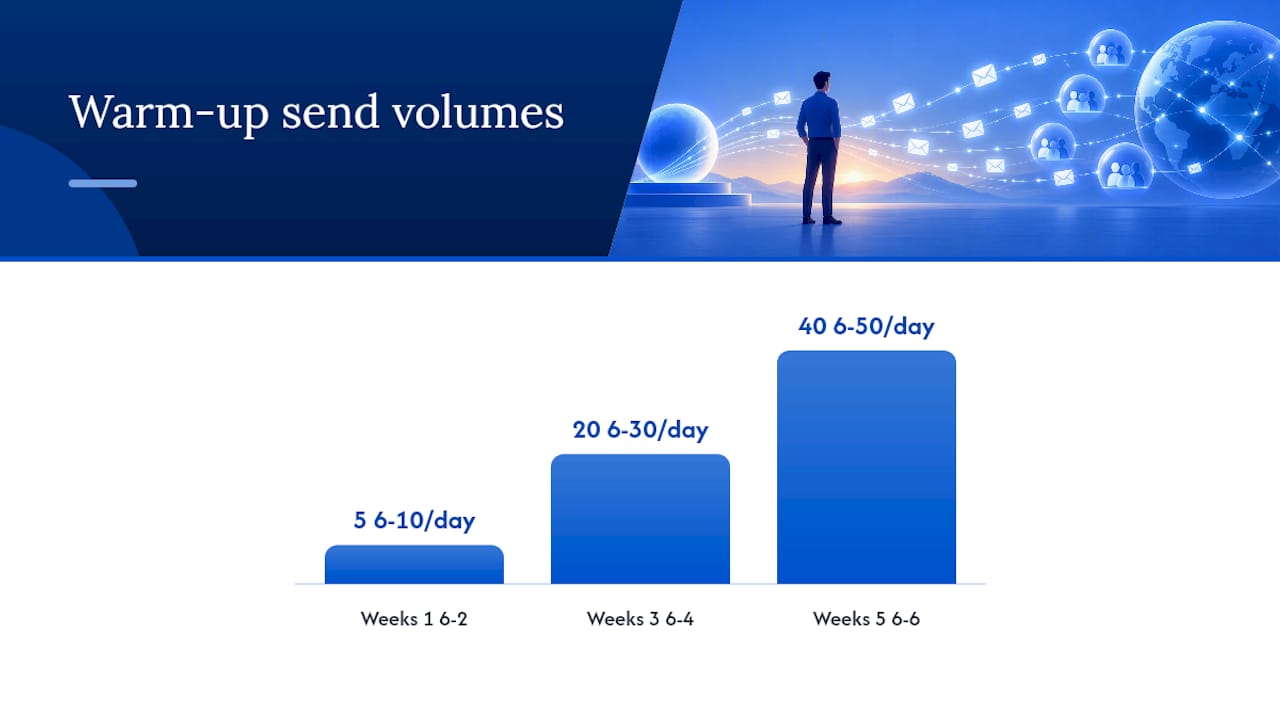
- Weeks 1 to 2: Send 5 to 10 emails per day per mailbox, exclusively to real contacts who reply, colleagues, friendly prospects, warm connections. Every reply signals health to the receiving server.
- Weeks 3 to 4: Ramp to 20 to 30 emails per day per mailbox. Start introducing a small percentage of actual cold prospects, but keep the mix mostly warm.
- Weeks 5 to 6: Push to 40 to 50 emails per day per mailbox, now weighted toward real cold outreach targets.
- Week 7 onward: Hold at a sustained baseline of several dozen emails per mailbox per day. This is the safe long-term ceiling for a single mailbox chasing cold prospects; going higher invites provider throttling even on aged domains.
Practitioner audits recommend a minimum 14 to 21 day warm-up window before any serious volume, paired with ongoing monitoring rather than a “set it and forget it” launch, and that timeline holds up across most domain reputation systems, not just one provider.
Scaling past what one mailbox can safely handle means adding mailboxes and domains, not pushing a single mailbox past its cap. A common architecture: 3 to 5 mailboxes per domain, each warmed independently, rotating sends across all of them so no single address carries the full daily load. If you need to send several hundred cold emails a day, you should use multiple mailboxes spread across several domains, not one domain screaming at full volume.
Rotation should feel human. Vary send times across the day rather than firing all messages in a single batch at 9:00 AM sharp, and avoid sending from the exact same IP for every mailbox if your platform allows IP diversity. Bot-like sending, identical timestamps, identical templates, zero variation in send gaps, is one of the clearest signals spam filters key on.
Pro Tip: Retire domains proactively. A domain that’s carried heavy cold volume for 6 to 12 months benefits from a planned rotation into a fresh one, even if it’s not showing problems yet, rather than waiting for reputation to visibly collapse.
Building and Maintaining a Clean Prospect List
A dirty list is the fastest way to torch a freshly warmed domain, no amount of authentication fixes a list full of dead addresses and spam traps. Verification isn’t a one-time step before your first send. It’s a recurring discipline.
- Run every list through a verification tool immediately before each send, not once at list-build time. Lists decay fast, roughly 2 to 3% of B2B emails go stale monthly as people change jobs.
- Drop role-based addresses (
info@,sales@,admin@) entirely. They rarely reach a real decision-maker and are disproportionately likely to be monitored spam traps. - Never buy lists from third-party data brokers without verification. Purchased lists are the single most common source of pristine spam traps, addresses created specifically to catch senders who skip due diligence.
- Segment and pause sending to any contact who hasn’t opened or engaged in 90 days. Continuing to hammer a cold, unresponsive address drags down engagement metrics that providers weigh heavily.
Yahoo’s own sender guidance is explicit on this point: separate your bulk outreach infrastructure from transactional mail, and never rely on unconfirmed opt-in lists for volume sending. The same logic that protects marketing newsletters protects cold outreach.
Set hard thresholds and honor them automatically if your platform supports it. A bounce rate creeping above 2% deserves a pause and list audit. Above 5%, stop sending from that domain entirely until you’ve identified the source. Complaint rates above 0.1% warrant investigation; above 0.3%, most mailbox providers will start throttling or blocking you regardless of how clean your authentication appears.
Re-verify your active list every 30 to 60 days, not just before the initial send. A list that was clean in January can carry 5 to 10% dead weight by March simply from normal attrition, job changes, company shutdowns, spam trap conversions from abandoned addresses. Building the list well matters, but keeping it clean matters more over a multi-month campaign, and proven list-growth strategies still need this same ongoing hygiene layered on top.
If we can’t make you money, we don’t deserve yours.
Pay-Per-Result pricing — performance-based alignment.
Volume, Throttling, and Sequence Design That Protect Your Sender Reputation
Once your domains are warmed and your list is clean, the math becomes simple: how many prospects can you reach without exceeding safe per-mailbox limits, and how do you sequence outreach so it reads as human rather than automated?
- Set per-inbox daily sends at 30 to 50 for cold prospects, even on well-aged domains. Calculate your mailbox count by dividing your target daily volume by that cap. Need to reach 1,000 prospects daily? You need roughly 20 to 30 active mailboxes, not 3.
- Design sequences around 3 touches, not 7 or 8. Data from campaign analysis shows tightly targeted, shorter sequences from disciplined infrastructure consistently outperform high-volume blasts on reply rate. A first email, a follow-up 3 to 4 days later, and a final touch 5 to 7 days after that covers most of the reply opportunity without fatiguing the domain or the prospect.
- Build auto-pause triggers into your sending platform. If bounce rate on any domain spikes past 5% within a 24 hour window, or complaints cross 0.3%, that domain should pause automatically rather than waiting for a human to notice a week later.
- Send during the recipient’s business hours, roughly 8:00 AM to 4:00 PM in their local time zone, Tuesday through Thursday tending to outperform Monday and Friday. Spreading sends across those hours rather than firing a single 9:00 AM batch also helps sends look organically timed rather than scripted.
The scaling math trips people up constantly: they calculate mailbox needs based on total prospect count, not daily safe capacity, then wonder why deliverability collapses in week three. Work backward from the per-mailbox ceiling every time.
Pro Tip: If you’re not sure whether to add mailboxes or slow down an existing campaign, add mailboxes. Reputation damage from over-sending a single domain takes far longer to reverse than the time it takes to warm a new one.
Writing and Formatting Emails That Don’t Trigger Spam Filters
Content matters less than infrastructure, but bad formatting can still sink an otherwise well-configured campaign. Modern spam filters read structure and metadata as much as they read words.
- Skip attachments entirely in cold outreach. Filters flag unsolicited attachments aggressively, and most recipients won’t open one from an unknown sender anyway.
- Send plain text or minimally styled HTML. Heavy formatting, multiple fonts, background colors, embedded images, reads as marketing mail to filters trained on legitimate bulk senders.
- Keep messages under 150 words. Long cold emails get skimmed, not read, and length itself correlates with lower reply rates independent of deliverability.
- Limit links to one, maybe two, and never use a link shortener. Redirect chains through third-party shorteners are a common trigger for filter suspicion because spammers rely on them to hide destination URLs.
- Avoid a landing page hosted on a domain with its own reputation problems. If your link destination is flagged, it can drag your sending domain down by association.
- Use a single clear call to action. Emails with three or four different asks, “reply, book a call, check out our site, download this,” read as scattered and increase the odds of a complaint click instead of a reply.
- Personalize the first line with something specific to the recipient, their company, a recent announcement, a shared connection, rather than a generic template variable that obviously auto-filled.
Deceptive subject lines (“Re: our call” when there was no prior call) generate outsized complaint rates because they feel manipulative the moment the recipient realizes the trick. That single moment of distrust is often what drives a spam-button click rather than a deleted.
Testing and Monitoring That Tell You the Truth About Inbox Placement
Open rates lie. Reply rates tell you something, but only seed-based inbox placement testing tells you exactly where your email actually landed, primary inbox, promotions tab, or spam folder, across the providers that matter most.

Seed testing works by sending your campaign to a controlled panel of test addresses across Gmail, Outlook, and Yahoo, then checking which folder each one received the message in. This is the closest thing to ground truth in deliverability because it removes guesswork; you’re not inferring placement from engagement metrics, you’re seeing it directly.
Pair seed testing with provider-native tools:
- Google Postmaster Tools shows domain reputation, spam rate, and authentication success rate specifically for Gmail, updated daily.
- Microsoft SNDS (Smart Network Data Services) gives similar visibility into how Outlook and Hotmail see your sending IPs.
- Most cold email platforms surface bounce rate, complaint rate, and reply rate dashboards natively, check them daily during active campaigns, not weekly.
Threshold snapshot: Healthy campaigns keep bounce rate under 2 to 5%, spam complaints under 0.1 to 0.3%, and inbox placement above 90% across major providers. Cross any of those lines and it’s time to pause, not push through.
Run a seed test at the start of every new campaign and again any time you rotate domains or make a significant list change. Set automated alerts on bounce and complaint thresholds if your platform supports them, waiting for a weekly report to notice a problem means you’ve likely already sent several thousand damaging emails before anyone caught it.
What to Do the Moment Your Inbox Placement Drops
A sudden drop in replies usually means a placement problem, not a copy problem. Work through this in order rather than guessing.
- Check blocklist status first. Look up your sending domain and IP against major DNSBLs; Spamhaus documents how these lists work and why even one listing can tank delivery instantly.
- Re-verify your authentication records. A DNS change elsewhere, a platform migration, or an expired DKIM key can silently break alignment without any obvious error message.
- Audit your most recent list for quality. A sudden bounce spike often traces to one bad list import, not a gradual reputation decline.
- Cut volume by half immediately and hold there for a week while you diagnose, rather than continuing to send at full volume into a filter that’s already suspicious.
- If the domain shows no recovery after two to three weeks of reduced volume and clean sending, retire it and rotate to a pre-warmed backup domain rather than waiting longer.
Document every change you make during recovery, date, action, and resulting metric shift, so you can identify what actually fixed the problem instead of guessing after the fact.
How LeadsNow’s Pay-Per-Result Model Handles Deliverability at Scale
Running this infrastructure well takes ongoing attention: multiple domains warming on staggered schedules, daily monitoring dashboards, list re-verification cycles, and someone watching bounce thresholds every single day. The stack runs across AI-driven outbound systems, mixing AI sales agents with data analytics that adjust sending patterns and targeting continuously rather than on a fixed schedule.
The deciding factor for whether to build this in-house or hand it to a managed partner usually comes down to three things: whether you have someone dedicated to monitoring deliverability daily, whether you’re scaling past what a handful of mailboxes can safely carry, and whether your team has the authentication and DNS expertise to troubleshoot fast when placement drops. Teams missing any of those three tend to see reputation erode before they notice.
Earn the Inbox Before You Optimize the Message
Fix infrastructure first, then data, then targeting, then copy, in that exact order. Teams that flip this sequence spend months polishing subject lines while sending from a domain with broken DKIM. One overlooked authentication record has quietly cost more replies than any subject line ever could. This week, run one seed test and read the result honestly.
— Riley
Let LeadsNow Handle Deliverability While You Handle Sales Calls
This service acts as an alternative to building an in-house deliverability operation from scratch: clients pay only when a qualified appointment lands on their calendar, so the incentive to protect inbox placement sits with the team actually sending the email, not with a retainer client hoping for the best.
That alignment matters because everything covered above, warm-up schedules, domain rotation, list hygiene, seed testing, is ongoing operational work, not a one-time setup. AI sales agents run the stack continuously, combining AI-powered outbound with human qualification so appointments booked are actually qualified, not just inboxed. The pricing model reflects that: a per-result fee or revenue share rather than a flat monthly cost regardless of outcome, detailed on the pricing page.
If you’re a coach, consultant, gym operator, or service business weighing whether to keep managing domains and warm-up cadences yourself, look at AI Appointment Setting or explore AI Lead Generation to see how the pay-per-result structure works for your specific volume needs. Book a look at your pipeline and get a straight answer on what a managed setup would cost you per booked call.
Where to Verify Your Setup and Keep Monitoring It
Check your own authentication against Gmail’s bulk sender requirements and Outlook’s high-volume sender policy. Use Spamhaus to check blocklist status, and review Yahoo’s sender guidance for list hygiene standards. FCC’s CAN-SPAM overview covers legal requirements for sender identity and opt-outs.
Sources
- Authenticate your email at scale – Gmail Help
- Strengthening the email ecosystem: Outlook’s new requirements for high‑volume senders
FAQ
What Is Cold Email Deliverability?
Cold email deliverability is the measure of whether your unsolicited outreach emails actually reach a recipient’s primary inbox rather than getting filtered to spam or rejected outright. It depends primarily on domain authentication (SPF, DKIM, DMARC), sender reputation built through warm-up, and list quality, with message content playing a smaller role than most senders assume.
What Is the 30/30/50 Rule for Cold Emails?
Definitions of this rule vary across the industry, and there’s no single authoritative source pinning it to one exact framework.
How Do I Check My Cold Email Deliverability?
Run a seed-based inbox placement test across Gmail, Outlook, and Yahoo to see exactly which folder your emails land in, then cross-check domain health in Google Postmaster Tools and Microsoft SNDS. Track bounce rate, complaint rate, and reply rate daily, and treat a bounce rate above 2 to 5% or complaints above 0.1 to 0.3% as an immediate signal to pause and investigate.
Does Cold Emailing Still Work?
Cold email still works when infrastructure is handled correctly, but volume-first blasting from unauthenticated domains largely stopped working once major providers tightened enforcement. Campaigns built on properly warmed domains, clean lists, and tight sequencing consistently outperform high-volume approaches on reply rate, and services like LeadsNow’s AI Sales Agents are built specifically around that discipline.
How Long Does Domain Warm-Up Take Before Cold Sending?
Most practitioner guidance recommends a minimum warm-up window of 14 to 21 days before sending meaningful cold volume, with a full ramp to sustained daily limits taking closer to six weeks. Skipping this step is the most common reason a brand new domain lands in spam within its first week of use.
Recommended
- 10 email marketing tips for gyms that you need to follow!
- Here are 7 reasons why you need email marketing for gyms!
- 5 Gym SMS Templates You Should Be Using – Leads Now AI
- 6 FITNESS BUSINESS LEAD GENERATION HACKS | More Gym Members
Pay-Per-Result appointments
See if we’re a fit
We book qualified sales appointments for you and you pay on results, not retainers. Our booking page asks a few quick questions so you find out in two minutes whether that model suits your business.
- 50,769+ appointments booked without cold calling.
- Pay-Per-Result pricing — you pay for booked, qualified calls.
- Pick your own time on our live calendar, no phone tag.